From Commit to Containment: An AppSec Pipeline on AWS
A pipeline that scans, signs and policy-checks every release, then traces each attack back to the exact build that was running.
I built a pipeline on AWS that can answer one question most teams can’t: which release was live when this attack started, and what did its security scans say?
TL;DR. Every change to this lab is scanned by eight security gates, signed, and checked against policy before it runs on ECS Fargate. Every runtime event carries the release it came from, so an attack can be traced back to the exact build. When I attacked it myself, it detected me and blocked my IP automatically.
Code: github.com/eguidey/aws-pipeline-2
The problem: two systems that never talk
Most teams have a CI/CD pipeline and a SIEM, and the two don’t share context. The pipeline knows what was deployed, when, and what its scans found. The SIEM knows something suspicious is happening right now.
When an incident starts, the analyst sees an alert with no build history. The developer sees a green pipeline with no idea it’s under attack. Reconnecting those two stories by hand is slow, and it’s where incidents stretch from hours into days.
So I set myself one rule for this lab: every deploy and every runtime event must be joinable. If I can’t point at an attack and name the commit that was running, the design has failed.
The architecture
The lab has three lanes, and a change has to survive all of them before it can serve traffic.
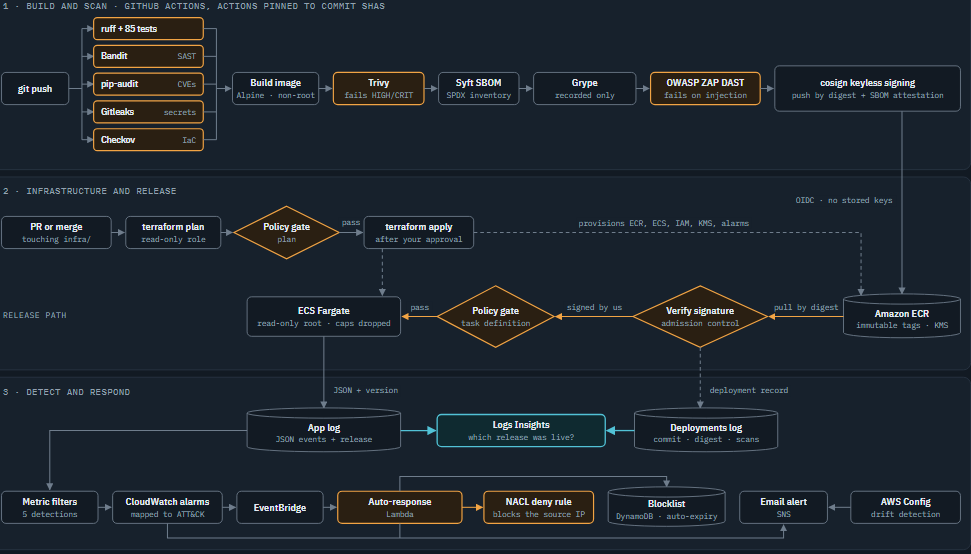
- Build and scan. A
git pushruns eight security gates in GitHub Actions, then builds, scans, attacks and signs a container image. - Infrastructure and release. Terraform changes go through their own pipeline with a policy gate. App releases must pass signature verification and a second policy gate before ECS Fargate will run them.
- Detect and respond. The app emits structured security events. CloudWatch turns them into alarms, and a Lambda blocks attackers at the network layer.
The stack is Python (Flask) on ECS Fargate, built with GitHub Actions and 8 Terraform modules. It has no load balancer and no NAT gateway, which keeps it close to free while it runs.
One detail runs through all three lanes: the release version. The pipeline stamps it on the image, on the deployment record, and on every log line the app writes. That shared key is what makes the whole thing joinable.
Shift left: eight gates before anything ships
Every push runs the same gauntlet. Any gate can stop the release, and each one catches a different class of mistake.
| Gate | Tool | Fails the build when |
|---|---|---|
| Lint and tests | ruff, pytest (97 tests) | A test fails, including tests of the security controls themselves |
| SAST | Bandit | Medium-or-higher issue in the Python code |
| Dependencies | pip-audit | A pinned library has a known CVE |
| Secrets | Gitleaks | A credential appears anywhere in git history |
| Infrastructure code | terraform validate, Checkov | Invalid Terraform, or a misconfiguration (299 checks pass) |
| Image scan | Trivy | A fixable HIGH or CRITICAL vulnerability |
| SBOM + second scan | Syft, Grype | Never; recorded as evidence, not blocking |
| DAST | OWASP ZAP | SQL injection, XSS, command injection or path traversal against the running container |
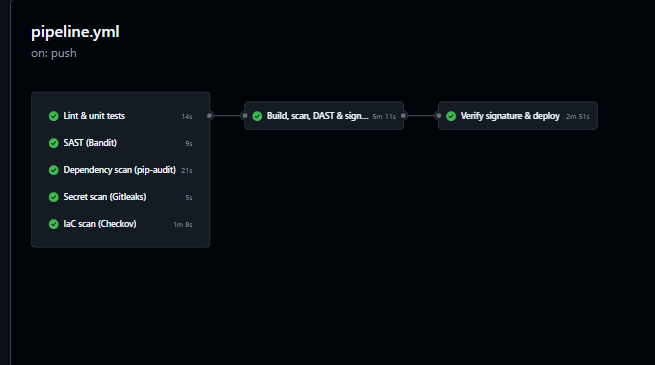
One decision here is easy to miss. Every third-party GitHub Action is pinned to a full commit SHA, not a version tag. Tags can be moved. In March 2026, attackers moved almost every version tag of a popular scanner action to credential-stealing code. A SHA can’t be moved, and Dependabot still proposes updates.
The second scanner, Grype, is deliberately not a gate. Two vulnerability databases disagree on edge cases, so Trivy decides and Grype adds evidence to the deployment record.
Supply chain: only images this pipeline built can run
Scanning an image is only useful if the scanned image is the one that runs. Three controls make sure it is.
- Push by digest, never by tag. The registry (ECR) has immutable tags, and the pipeline deploys the image’s
sha256digest. Nobody can swap the image behind a name. - Keyless signing with cosign. The image and its SBOM are signed with the workflow’s own short-lived GitHub identity, through Sigstore. There is no signing key to steal.
- Admission control. Before deploying, the deploy job verifies the signature was made by this exact workflow on
main. Anything else is refused.
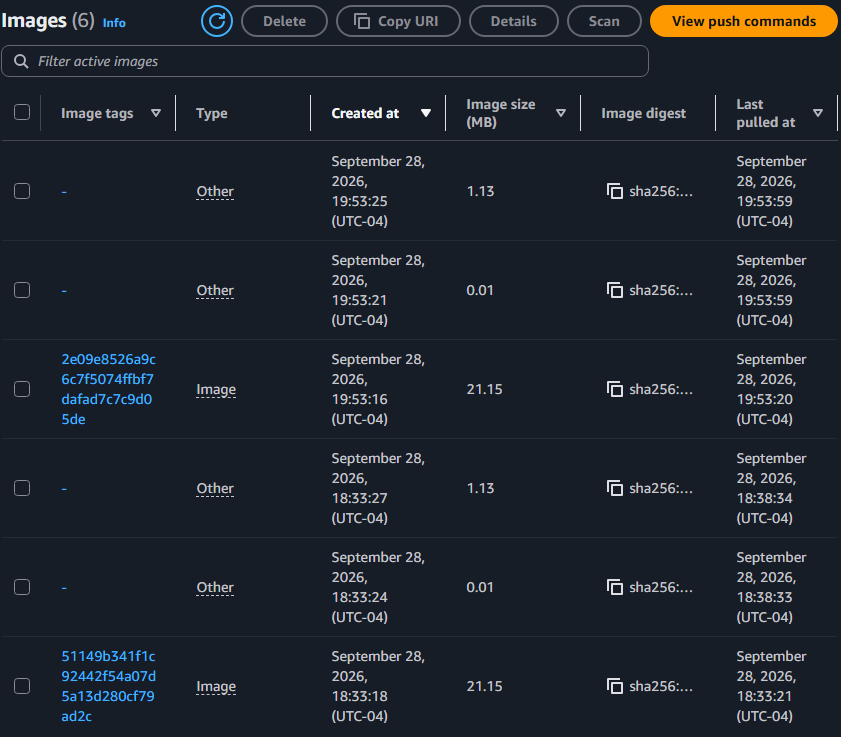
A human stays in the loop too. Production deploys wait in a protected GitHub environment until I approve them.
The pipeline never holds an AWS key. It logs in with OIDC, and the deploy role trusts only my repository’s main branch and production environment, by name and by GitHub’s numeric IDs. A fork or a copied repo can’t use it.
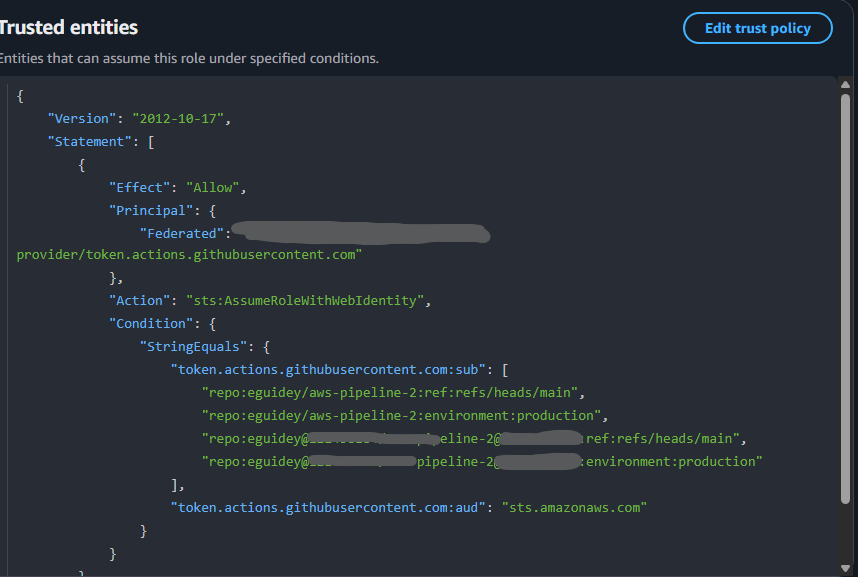
main branch or production environment.Infrastructure as a pipeline, with a policy gate
The AWS side is 8 Terraform modules: network, registry, app service, CI/CD identity, KMS, detection, response and guardrails. Terraform itself runs in GitHub Actions, the same way the app does.
| Event | AWS role | What runs |
|---|---|---|
| Pull request | Read-only plan role | terraform plan, then the policy gate |
Merge to main |
Apply role, only from a protected environment | Plan, policy gate, my approval, then apply exactly that plan |
Those CI roles live in a separate bootstrap stack with the state bucket. Destroying the app can never delete the identity the pipeline needs to rebuild it.
Policy as code: detect is not enough
AWS Config tells you about a misconfiguration after it’s live. I wanted the equivalent of Azure Policy’s deny: stop the bad change before it exists. One rules file, policy/rules.json, is enforced at four points:
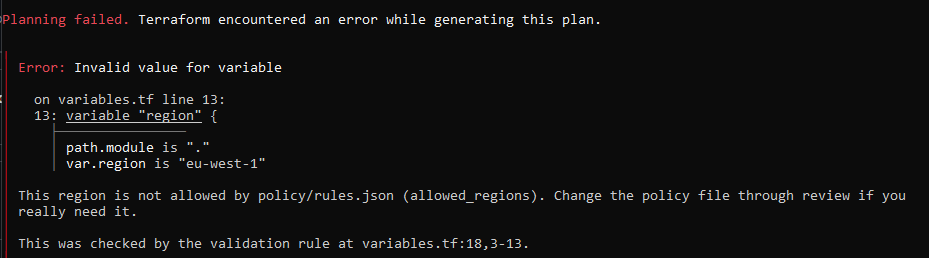
- Terraform input validation: only approved regions and valid Fargate CPU/memory sizes are accepted.
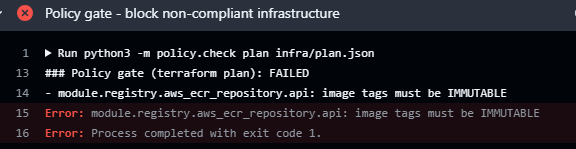
- Plan gate: blocks mutable image tags, unencrypted logs, SSH open to the internet, IAM users with access keys, and container hardening removed from the task definition.
- Deploy gate: checks the exact task definition about to be registered.
- IAM explicit deny: every CI role is locked to the approved regions, even if an Allow grows too broad later.
To prove it, I opened a pull request that made the image tags mutable. The pipeline rejected it before Terraform touched AWS.
The same rules file drives Terraform’s own input validation, so a disallowed region fails before a plan even exists.
Runtime: a locked-down container that tells on attackers
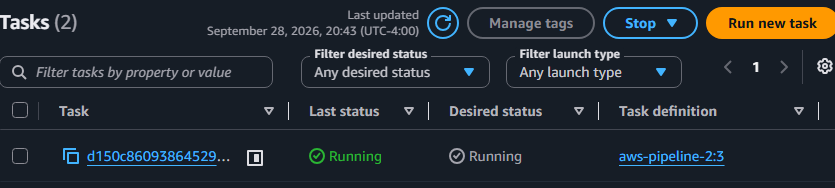
The API runs on ECS Fargate with as little room to misbehave as I could give it:
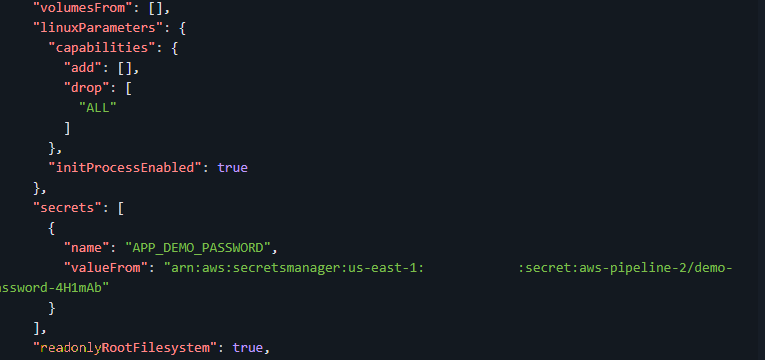
- a read-only root filesystem, with
/tmpas the only writable path - a non-root user, with every Linux capability dropped
- the image pinned by digest, never by tag
- zero AWS permissions for the app itself; only the execution role can pull the image and read one secret
The app is also a sensor. Every request is checked against signatures for SQL injection, XSS, path traversal and command injection, including URL-encoded and double-encoded tricks. It doesn’t block on a match; it writes a structured JSON event. Every event carries the source IP, the request ID and the release version the pipeline deployed.
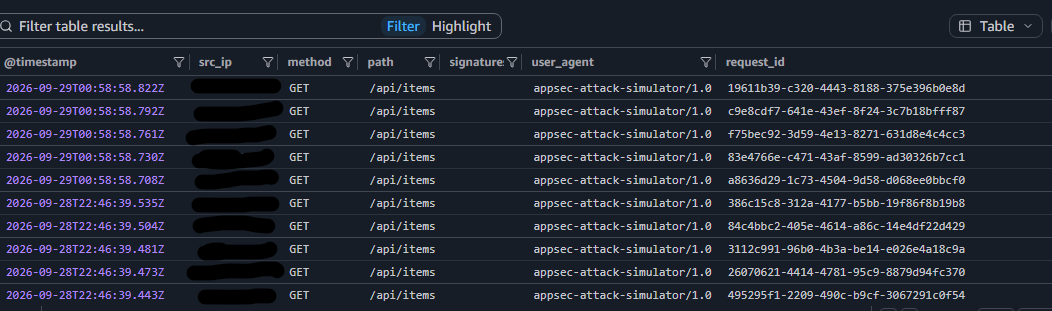
The code has its own controls too: rate limiting, brute-force tracking, a constant-time password check, identical errors for a wrong username or password, a 16 KB body limit and OWASP security headers.
Attacking my own API
A detection you haven’t fired is a guess. So I pointed the lab’s attack simulator at my own deployment: password guessing, SQL injection, XSS, path traversal, command injection and a request flood.
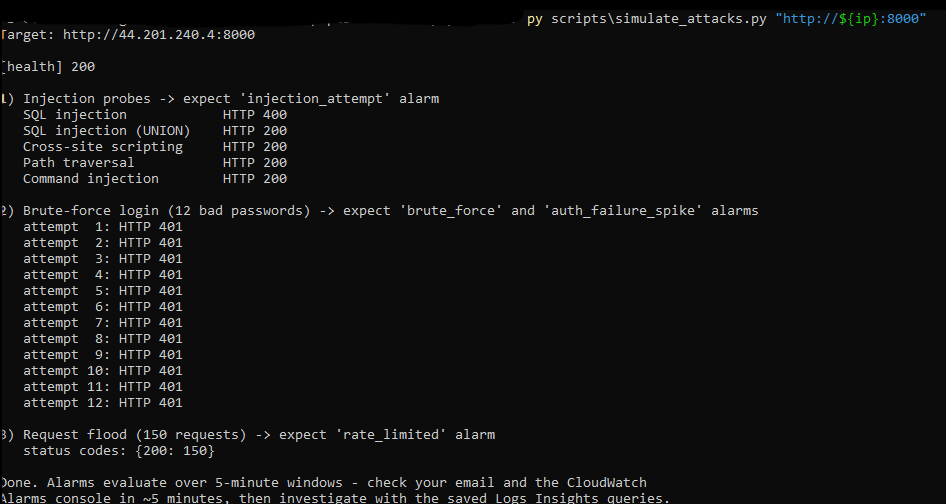
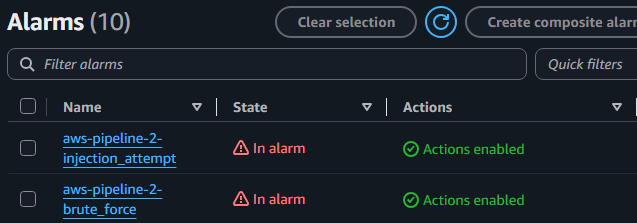
CloudWatch metric filters turn the app’s events into five detections, each mapped to MITRE ATT&CK:
| Detection | Fires on | ATT&CK | Response |
|---|---|---|---|
brute_force |
5+ failed logins from one IP in 5 minutes | T1110 | Block the source IP |
injection_attempt |
Any SQLi, XSS, traversal or command-injection signature | T1190 | Block the source IP |
auth_failure_spike |
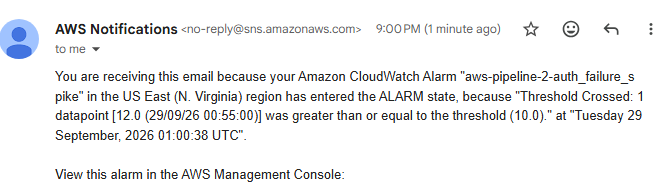
10+ failed logins overall in 5 minutes | T1110.003 | Alert |
rate_limited |
20+ throttled requests in 5 minutes | T1499 | Alert |
server_errors |
5+ HTTP 5xx responses in 5 minutes | Fault or exploitation | Alert |
The automated response
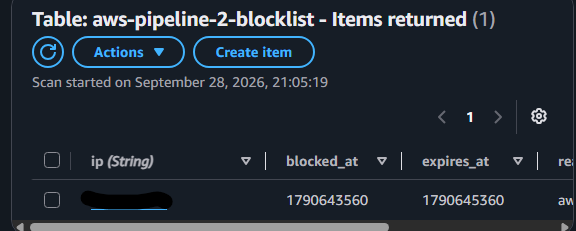
When brute_force or injection_attempt fires, EventBridge invokes a Lambda. It queries the logs for the offending IPs, skips private and never-block addresses, and adds a deny rule to the network ACL. I used a NACL because security groups can only allow traffic; NACLs can explicitly deny it. Each block is recorded in DynamoDB with an expiry, and a scheduled run lifts it after 30 minutes.
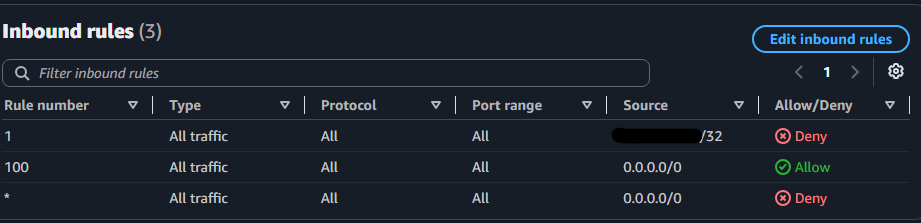


The system blocked me, its own author, within minutes and without a human in the loop. A dry-run mode (notify) emails what it would block without blocking, which is how I’d roll this out anywhere real.
The bridge: which release was live when the attack started?
This is the part the whole lab exists for. Two log streams, one shared key:
- Deployment records. At the end of every deploy, including failed and blocked ones, the pipeline writes one JSON record to
/aws-pipeline-2/deployments: commit, image digest, whether the signature and policy gate passed, SBOM package count, Grype and ZAP results, and a link to the run. - Runtime events. Every app event in
/ecs/aws-pipeline-2carries the sameversion.
Saved Logs Insights queries join them:
| Query | Answers |
|---|---|
deployment_timeline |
Releases and attacks on one timeline |
attacks_by_release |
Which release was running during each attack |
release_scan_history |
Every release with its signature, policy and scan evidence |
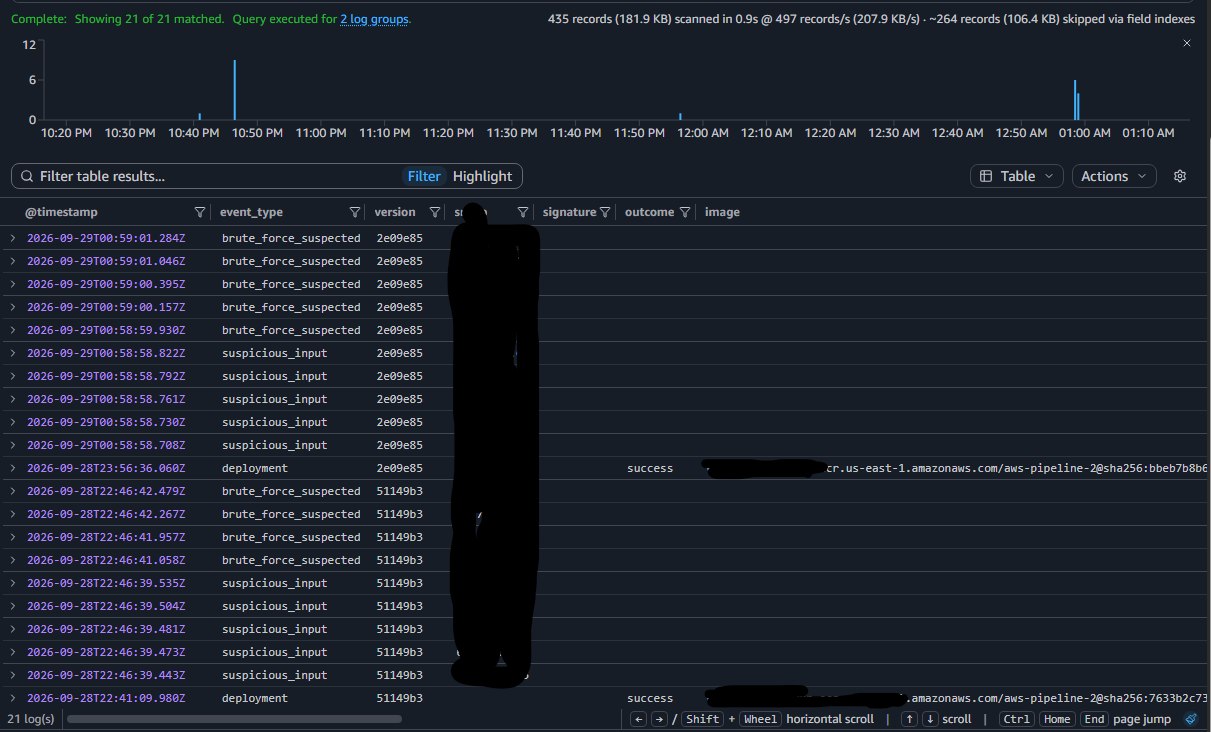
With this, an analyst’s first question (“what changed?”) is one query instead of a Slack thread. It works in reverse too: from any release, I can see every attack it faced.
CloudWatch Logs Insights is standing in for a full SIEM here. The design carries over to Sentinel or Splunk unchanged; only the destination moves.
Cost, trade-offs, and what’s next
The lab is built to run on Free Tier credits. The container costs about $0.40 a day while it runs, and I scale it to zero between sessions. A $10 budget alert is created automatically.
The trade-offs, stated plainly:
- No load balancer or HTTPS. An ALB costs about $16 a month. In production I’d put the tasks in private subnets behind an ALB with AWS WAF, and have the responder update a WAF IP set instead of a NACL.
- Logs Insights, not a full SIEM. It proves the correlation design without a SIEM license.
- Blocking by IP is blunt. It stops a lab attacker. Real attackers rotate IPs, which is why the edge (WAF) matters.
What I’d build next:
- Continuous detection testing. Run the attack simulator nightly and fail the pipeline if an alarm doesn’t fire. Detections deserve regression tests as much as code does.
- Release-aware response. Put the live release and its scan results in every alert, and roll back automatically if errors spike right after a deploy.
- Microsoft Sentinel as the SIEM. An AWS workload feeding an Azure SIEM, for a true multi-cloud setup.
What I learned
- Context is the product. Any single control here is standard. The value came from one shared release version that ties the build, the scans and the runtime together.
- Prevent where you can, detect where you must. AWS Config catches drift after the fact. The policy gates stop the same mistakes before they exist, and I kept both.
- Test detections like code. Attacking my own deployment was the only way to know the alarms, the Lambda and the NACL actually connect.
The code, Terraform and setup guide are on GitHub: eguidey/aws-pipeline-2. If you build on it, I’d like to hear what you change.