One Command per Ticket: Building a Help Desk Toolkit
A cross-platform command-line toolkit that turns the most common help desk tickets into one command and a clear answer.
Help desks hear the same tickets on repeat: “my computer is slow,” “the internet is down,” “I’m out of space,” “new hires start Monday.” I built a Python toolkit that answers each one with a single command, on Windows, macOS and Linux.
Code: github.com/eguidey/helpdesk-toolkit
The commands
| Command | Solves |
|---|---|
sysinfo |
“What computer is this?” / “It’s slow” |
netcheck |
“The internet is down” |
diskcheck |
“I’m out of space” |
procs |
“My computer is slow” |
pwcheck |
Password resets |
onboard |
New-hire accounts |
report |
Escalations |
netcheck: name the cause, not just the failures
It tests the network layer by layer (IP address, gateway, internet, DNS, web) and reports the first layer that breaks, in plain English.
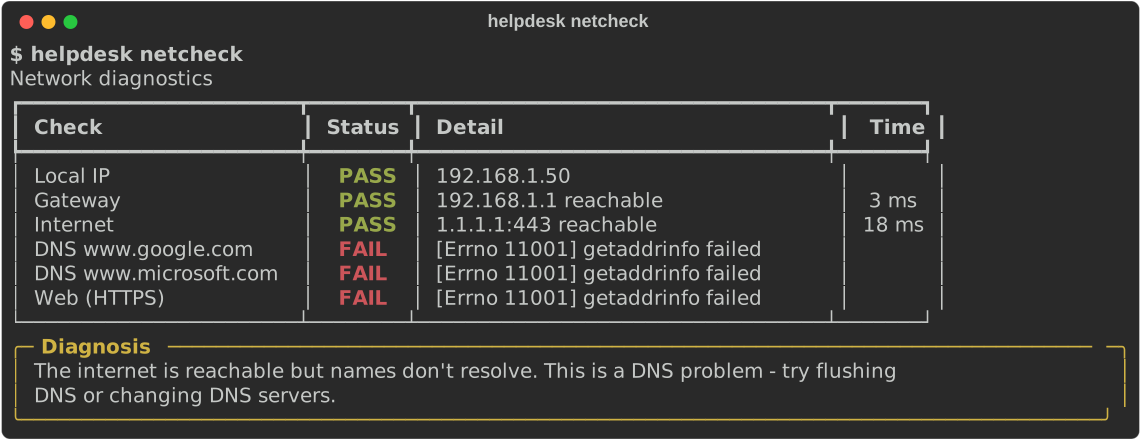
A 169.254.x.x address means DHCP failed. The internet test opens a TCP connection instead of pinging, since many networks block ping. And the gateway is only blamed when the internet is actually unreachable, so VPNs don’t trigger false alarms.
pwcheck: breach checks without sending the password
The password is hashed locally, and only the first 5 characters of the hash go to the Have I Been Pwned API. The comparison happens on the machine, and a unit test proves nothing more is sent.
onboard: new hires in one command
It turns an HR spreadsheet into usernames, emails and temporary passwords. Real output from the repo’s sample data:
┃ Name              ┃ Username   ┃ Email                  ┃
│ Ava Nguyen        │ anguyen    │ [email protected]    │
│ Adam Nguyen       │ anguyen2   │ [email protected]   │
│ Mary-Kate O'Brien │ mobrien    │ [email protected]    │
Duplicates get numbers, and punctuation is stripped. Passwords come from Python’s secrets module and skip look-alike characters (0/O, 1/l/I), so they can be read over the phone.
report: evidence for the escalation
One command writes a self-contained HTML health report to attach to the ticket.
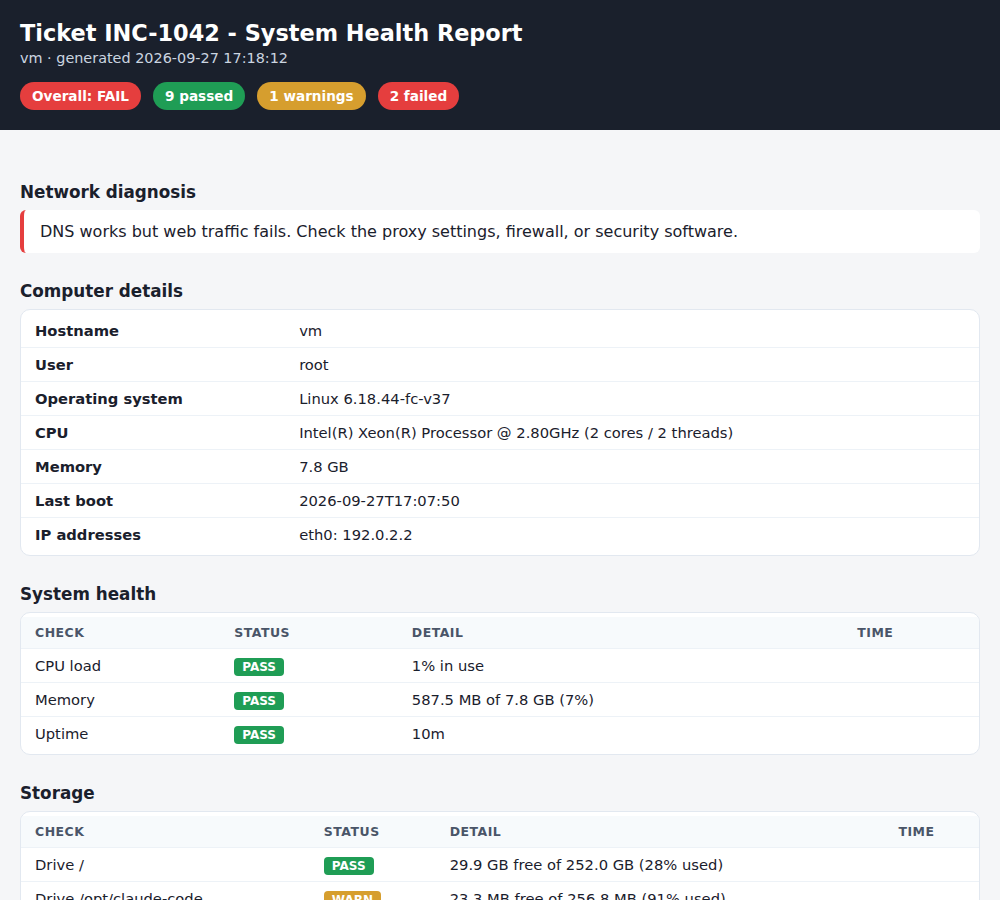
Every check also returns an exit code (0 good, 1 warning, 2 failure), so scripts and monitoring can use it too.
Built to be trusted
68 tests, CI on Windows, macOS and Linux for every push, and ruff’s security rules in the linter.
What I learned
- Diagnose, don’t just test. Naming the broken layer saves more time than a list of red checks.
- Privacy can be a design choice. The breach check works without the password ever leaving the computer.
- Design for the phone call. Small details, like readable passwords, matter as much as features.